Nestle Purina
Request Management system
Nestle Purina
Request Management system
Designing a human-in-the-loop system to prevent fraud in AI-driven loyalty programs
Designing a human-in-the-loop system to prevent fraud in AI-driven loyalty programs


My Role
UI/UX Designer
Timeline
3 weeks
Tools
Sketch, Zeplin, Jira, Illustrator
Responsibilities
End to end UX
UI design
User flows
Collaboration
System thinking
Overview
Purina developed a loyalty program where users earn reward points by uploading purchase receipts. The system uses AI (OCR) to extract transaction data and allocate points automatically.
However, real-world usage exposed a critical gap. Poor image quality often led to incorrect data extraction. To improve accuracy, users were allowed to manually enter bill details—but this introduced a new problem: data manipulation, where users could inflate transaction values to gain extra points.
To maintain trust and prevent misuse, a verification layer was needed.
Goal
Design a request management web platform where customer executives can:
Validate receipt data
Compare system-extracted vs user-entered inputs
Approve or reject requests efficiently
Problem breakdown
AI accuracy limitation
OCR fails on blurry or low-quality receipts
Manual entry risk
Users can intentionally put incorrect values
No verification system
No structured workflow for internal validation
Users
Customer Executives :
Handle support queries
Validate transaction requests
Approve/reject loyalty claims
Design approach
I approached it as a decision-making system where the primary goal was to help customer executives make fast, accurate, and confident judgments under uncertainty.
At its core, the problem wasn’t UI — it was resolving conflicting data from multiple sources.
INPUTS
PROCESS
OUTPUTS
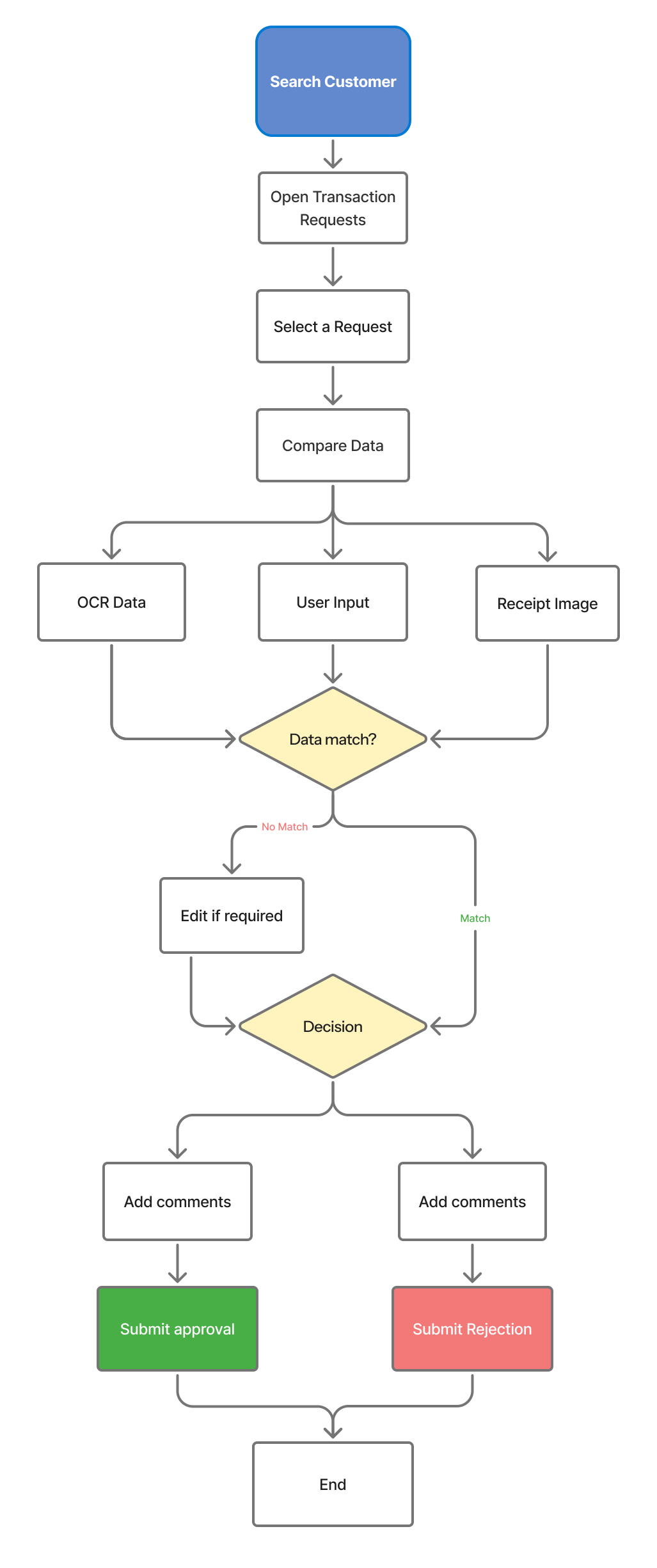
User flow
I tried to create the userflow from searching for a customer to approval or rejection of loyalty requests
Key Design solutions
While ideating the design, the focus was mostly on resolving the conflict of data.
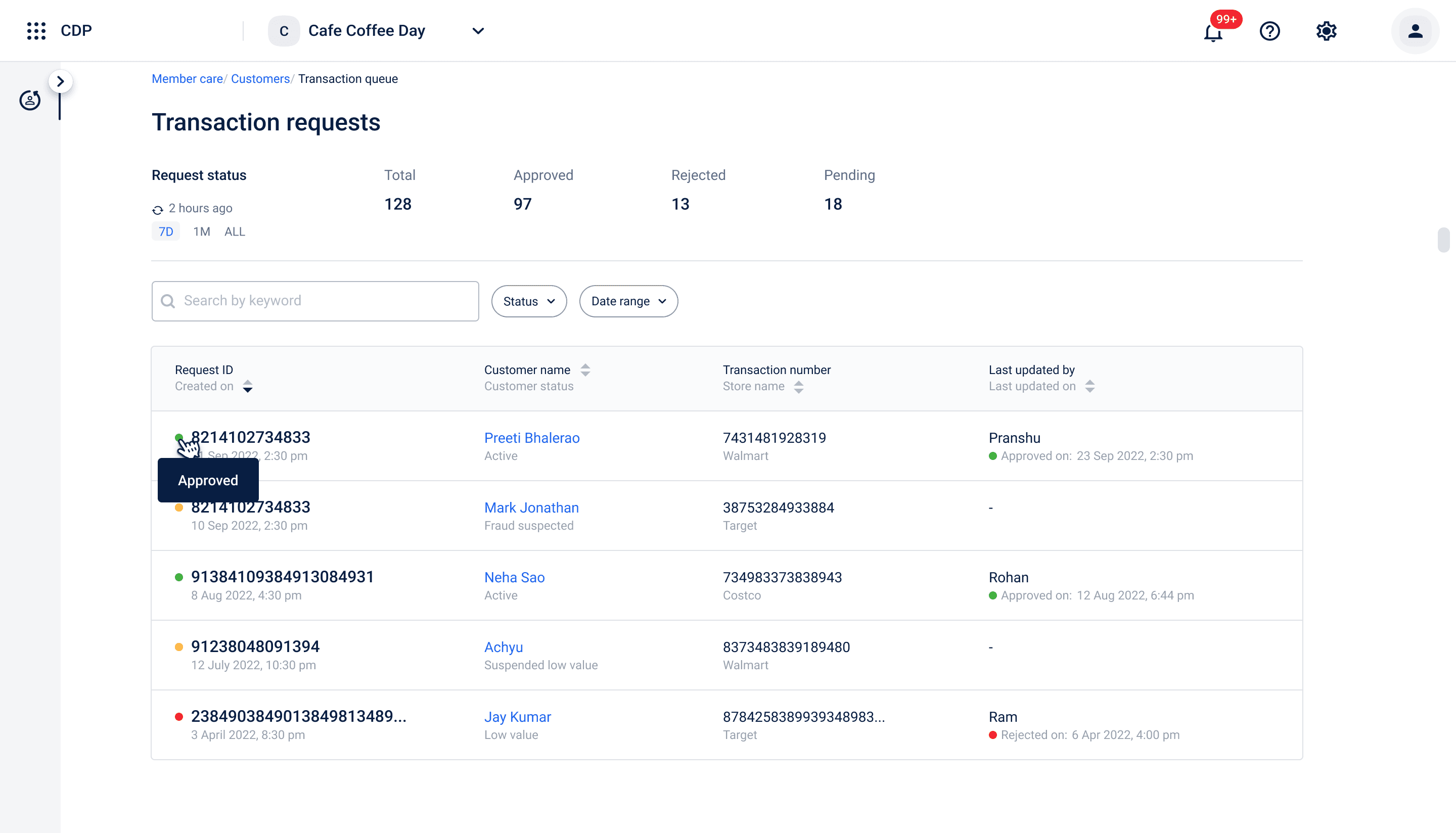
Transaction Request Dashboard
Problem:
Difficult to prioritize and scan requests
Solution:
Status based groupings (Pending/ Approved/ Rejected)
Filters (date, status)
Clear tabular layout
Impact:
Faster decision making
Reduced dependency on spreadsheets
Improved project visibility
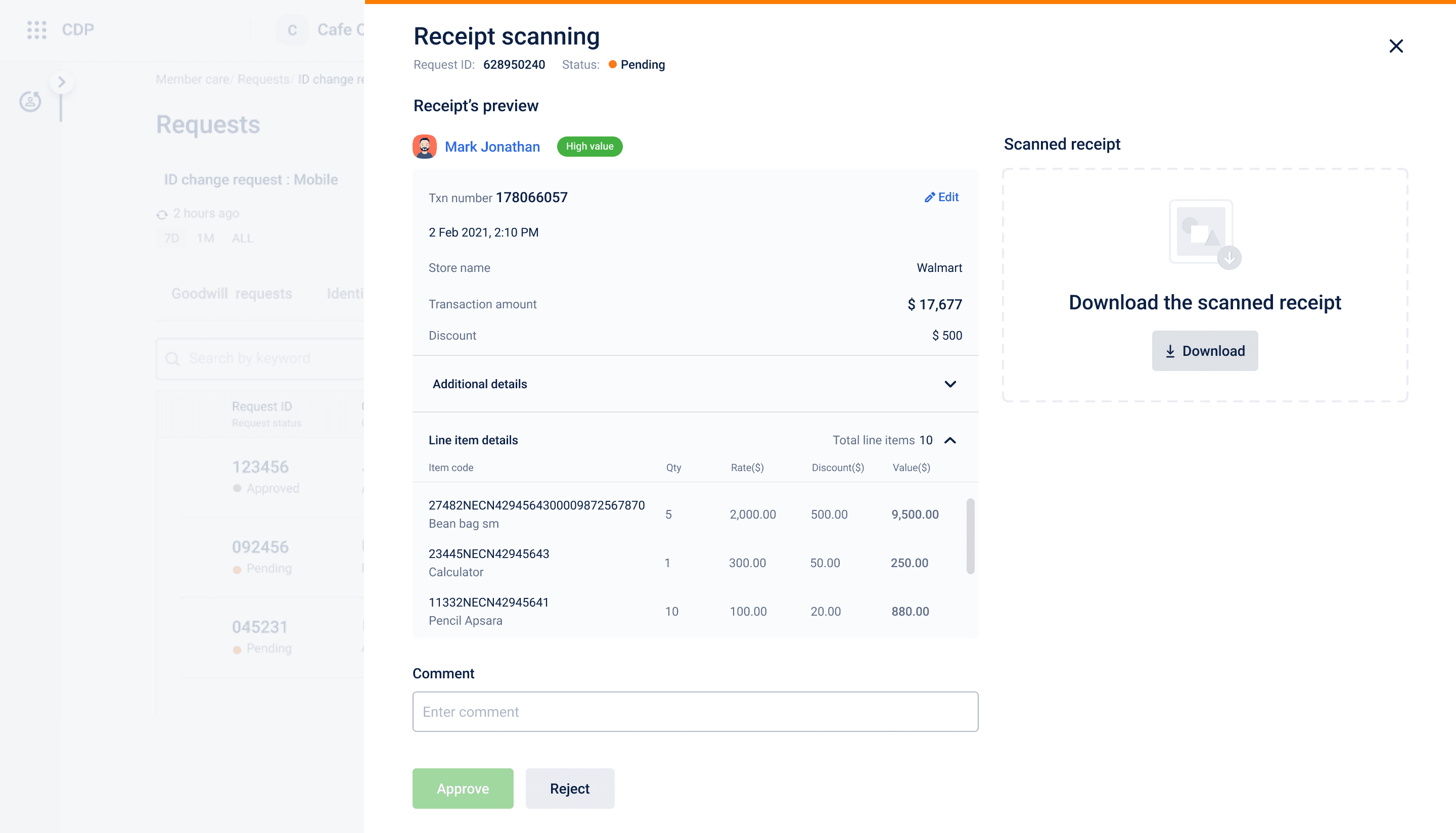
Validation (Core experience)
Problem:
Executives had to compare OCR data, user input, and receipts separately, leading to high cognitive load, slower decisions, and errors.
Solution:
Designed a unified validation screen with:
Side-by-side receipt and transaction details
Line-item level breakdown
Receipt download for verification
Impact:
Faster decision making
Reduced errors
Improved validation accuracy and confidence
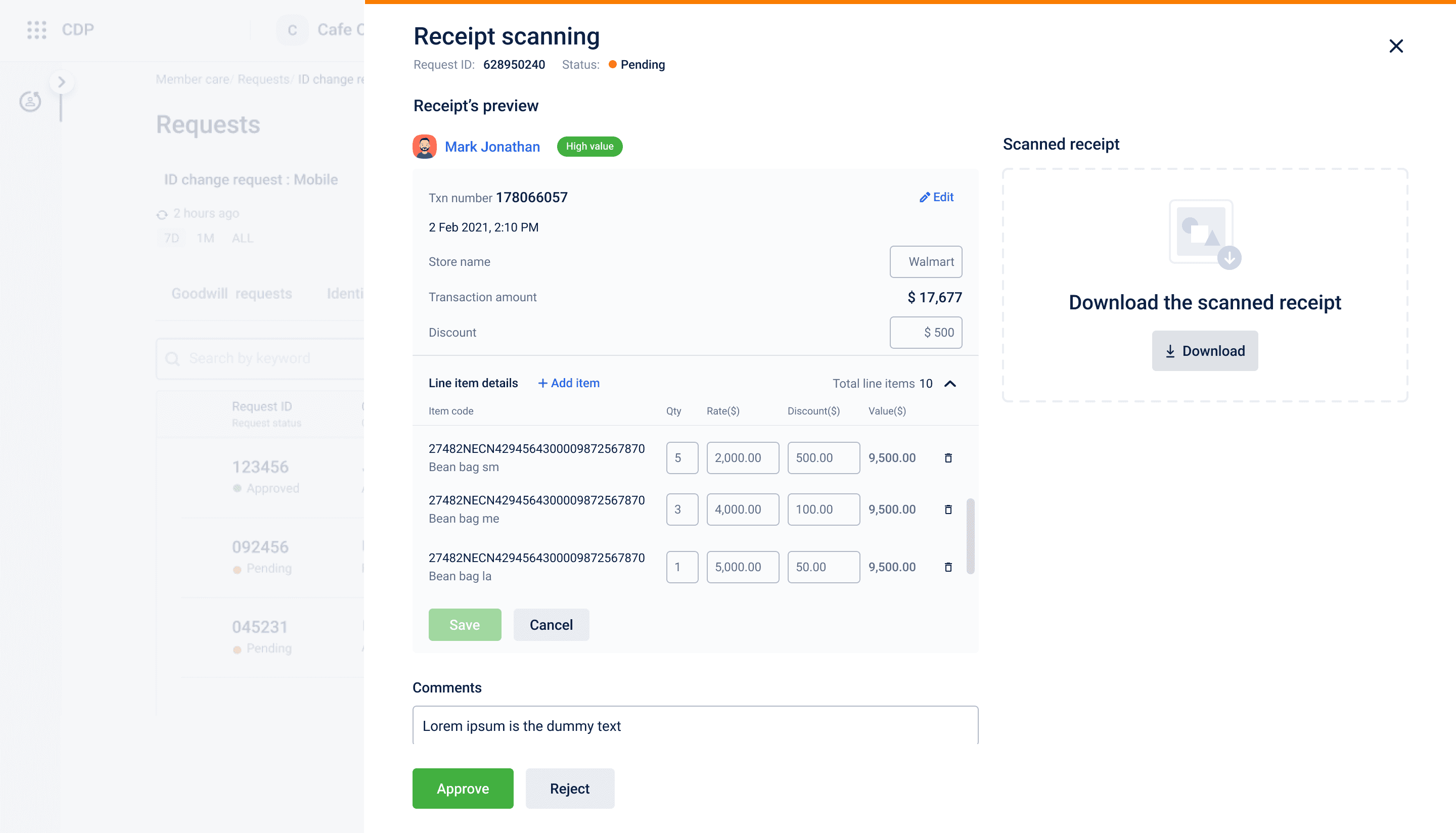
Inline editing
Problem:
Context switching slows down workflow
Solution:
Direct editing with the validation screen
Impact:
Faster corrections
Seamless experience
Iterations
Explored multiple iterations and then selected the best suitable ones for the final screens
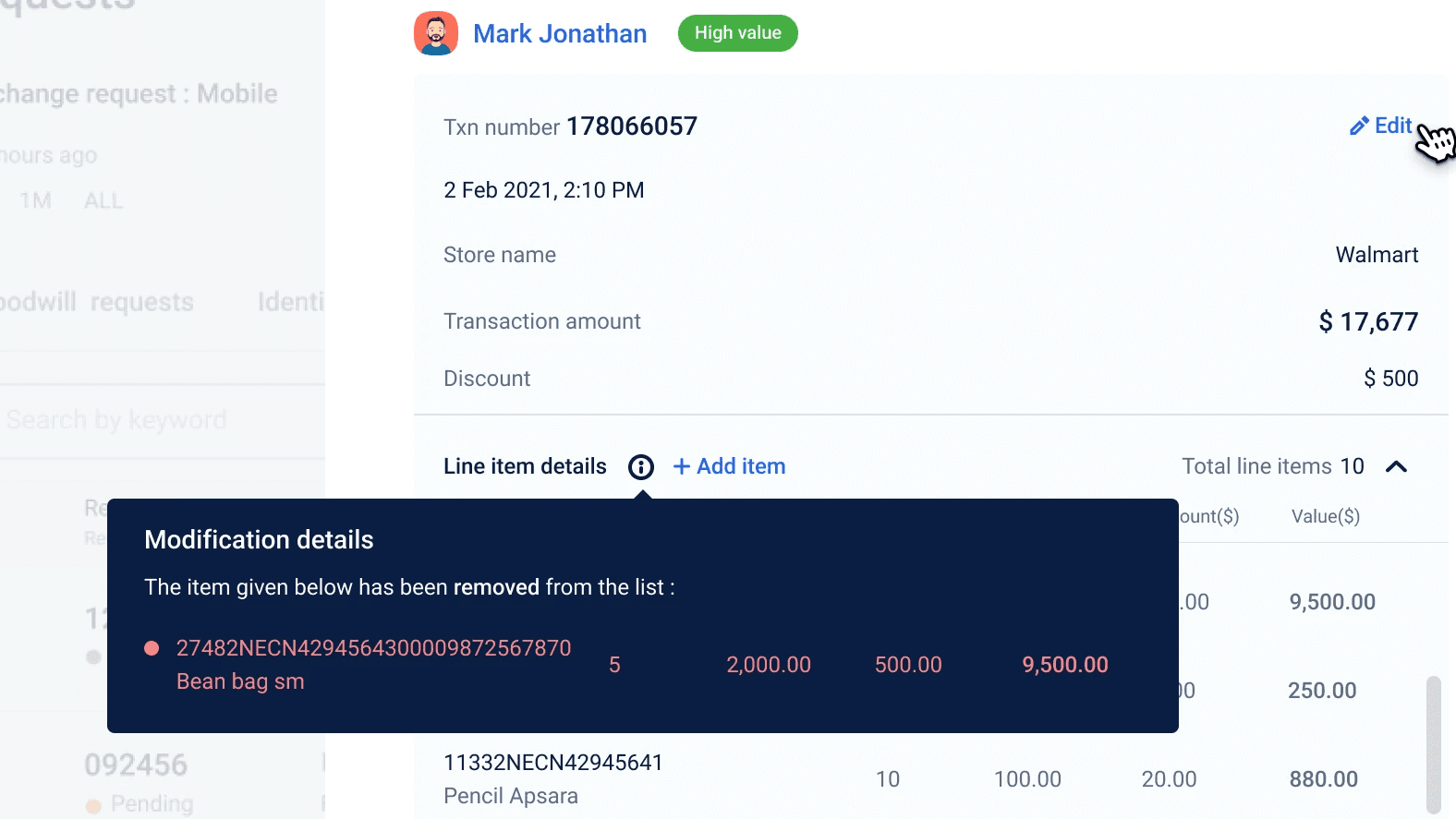
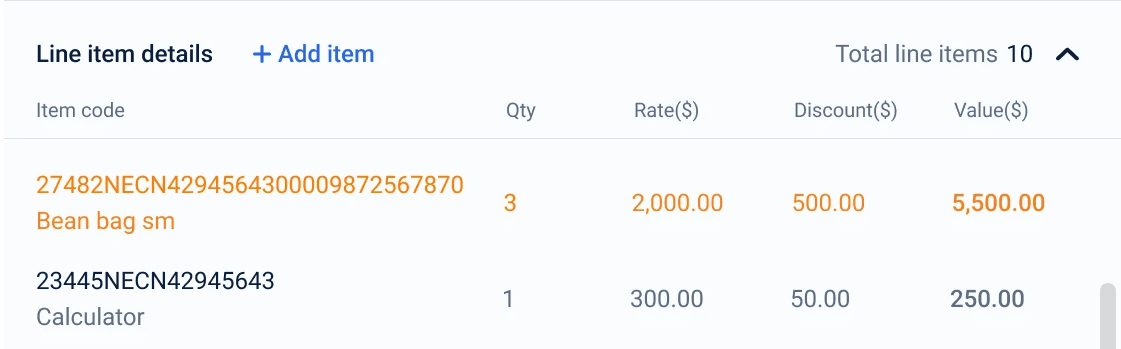
Modified line items
Edited line items
With tags
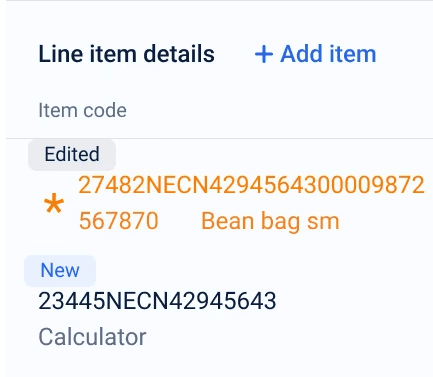
Color coded
Deleted line items
Strikeout
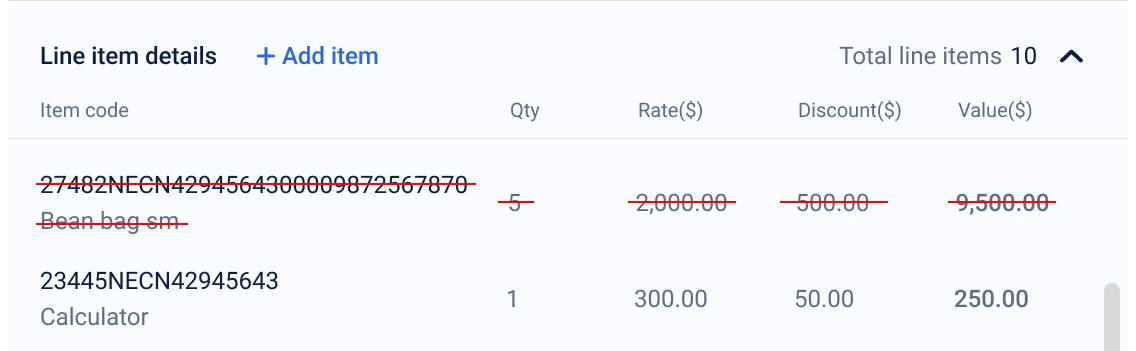
Rejected
Takes way too much attention
Selected
No need to develop anything extra
Saved time
Looks clean
Rejected
New tag needed to be added to styleguide
Takes more space
Looks a little messy
Rejected
Doesn't look clean
Rejected
Slows user by adding an extra click and also doesn't show the data upfront
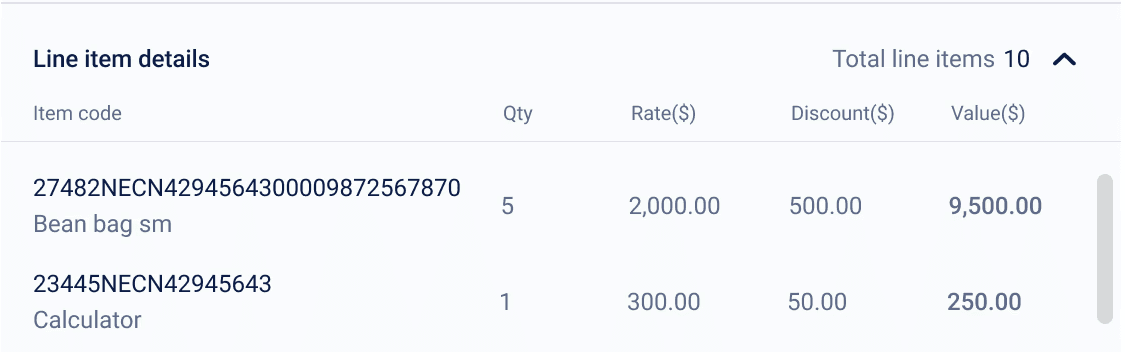
Modified ones
Any line item added or edited will be shown on top and deleted ones will not be shown
Design decisions
Why I took certain decisions
Why not fully automate ?
OCR is unreliable in real -world scenarios
Human validation ensures trust
Why line-item validation ?
Fraud often occurs at item level
Total amount alone is insufficient
Why side-by-side layout ?
Reduces memory load
Enables faster comparison
Design principles & UX laws used
Hick's law
Reduced decision complexity by structuring actions into clear Approve/Reject and by organizing data so users don't feel overwhelmed
Miller's law
Users shouldn't remember multiple data points. This applies on side by side comparison of receipt and data
Fitt's law
Clear prominent Approve/Reject CTAs
Law of proximity (Gestalt principle)
Grouped transaction details together and line-items also clearly structure in group
Aesthetic-usability effect
Even though it's a dense tool, I tried to give it a clean layout and clear hierarchy
Impact
Reduced fraudulent claims by ~20–30%
Improved request resolution time by ~30%
Increased operational efficiency for executives
Reduced customer support escalations
Improved trust in loyalty program
Conclusion
This project transformed a vulnerable AI-based loyalty system into a controlled, scalable, verification platform.
By introducing a structured validation workflow, the solution:
Better decision-making
Reduced fraud
Improved operational efficiency
This was not just a UI improvement, but a business-critical system design intervention
Learnings
Designing for operations teams ≠ designing for consumers
Speed + clarity is more important than visual delight
Systems thinking is critical for B2B products
Trust is a UX problem, not just a tech problem

Let's build together
My Role
UI/UX Designer
Timeline
3 weeks
Tools
Sketch, Zeplin, Illustrator, Jira
Responsibilities
End to end UX
Workflows
UI design
Collaboration with PM and Engineers
Overview
Purina developed a loyalty program where users earn reward points by uploading purchase receipts. The system uses AI (OCR) to extract transaction data and allocate points automatically.
However, real-world usage exposed a critical gap. Poor image quality often led to incorrect data extraction. To improve accuracy, users were allowed to manually enter bill details—but this introduced a new problem: data manipulation, where users could inflate transaction values to gain extra points.
To maintain trust and prevent misuse, a verification layer was needed.
Goal
Design a request management web platform where customer executives can:
Validate receipt data
Compare system-extracted vs user-entered inputs
Approve or reject requests efficiently
Problem breakdown
AI accuracy limitation
OCR fails on blurry or low-quality receipts
Manual entry risk
Users can intentionally put incorrect values
No verification system
No structured workflow for internal validation
Users
Customer Executives :
Handle support queries
Validate transaction requests
Approve/reject loyalty claims
Design approach
I approached it as a decision-making system where the primary goal was to help customer executives make fast, accurate, and confident judgments under uncertainty.
At its core, the problem wasn’t UI — it was resolving conflicting data from multiple sources.
INPUTS
PROCESS
OUTPUTS
User flow
I tried to create the userflow from searching for a customer to approval or rejection of loyalty requests
Key Design solutions
While ideating the design, the focus was mostly on resolving the conflict of data.
Transaction Request Dashboard
Problem:
Difficult to prioritize and scan requests
Solution:
Status based groupings (Pending/ Approved/ Rejected)
Filters (date, status)
Clear tabular layout
Impact:
Faster decision making
Reduced dependency on spreadsheets
Improved project visibility
Validation (Core experience)
Problem:
Executives had to compare OCR data, user input, and receipts separately, leading to high cognitive load, slower decisions, and errors.
Solution:
Designed a unified validation screen with:
Side-by-side receipt and transaction details
Line-item level breakdown
Receipt download for verification
Impact:
Faster decision making
Reduced errors
Improved validation accuracy and confidence
Inline editing
Problem:
Context switching slows down workflow
Solution:
Direct editing with the validation screen
Impact:
Faster corrections
Seamless experience
Link Customer profile
Problem:
Some customers might enter wrong data by mistake & that can lead to a bad experience, specially for genuine ones.
Solution:
Linked the customer profile to get more detailed info like member since or how many mistakes has been made previously, etc.
Impact:
Reduced need to switch between system
Better identification of fraud patterns
Iterations
Explored multiple iterations and then selected the best suitable ones for the final screens
Modified line items
Edited line items
With tags
Color coded
Deleted line items
Strikeout
Rejected
Takes way too much attention
Selected
No need to develop anything extra
Saved time
Looks clean
Rejected
New tag needed to be added to styleguide
Takes more space
Looks a little messy
Rejected
Doesn't look clean
Rejected
Slows user by adding an extra click and also doesn't show the data upfront
Modified ones
Any line item added or edited will be shown on top and deleted ones will not be shown
Design decisions
Why I took certain decisions
Why not fully automate ?
OCR is unreliable in real -world scenarios
Human validation ensures trust
Why line-item validation ?
Fraud often occurs at item level
Total amount alone is insufficient
Why side-by-side layout ?
Reduces memory load
Enables faster comparison
Design principles & UX laws used
Hick's law
Reduced decision complexity by structuring actions into clear Approve/Reject and by organizing data so users don't feel overwhelmed
Miller's law
Users shouldn't remember multiple data points. This applies on side by side comparison of receipt and data
Fitt's law
Clear prominent Approve/Reject CTAs
Law of proximity (Gestalt principle)
Grouped transaction details together and line-items also clearly structure in group
Aesthetic-usability effect
Even though it's a dense tool, I tried to give it a clean layout and clear hierarchy
Impact
Reduced fraudulent claims by ~20–30%
Improved request resolution time by ~30%
Increased operational efficiency for executives
Reduced customer support escalations
Improved trust in loyalty program
Conclusion
This project transformed a vulnerable AI-based loyalty system into a controlled, scalable, verification platform.
By introducing a structured validation workflow, the solution:
Better decision-making
Reduced fraud
Improved operational efficiency
This was not just a UI improvement, but a business-critical system design intervention
Learnings
Designing for operations teams ≠ designing for consumers
Speed + clarity is more important than visual delight
Systems thinking is critical for B2B products
Trust is a UX problem, not just a tech problem